Why Your Website Can Be Flagged as Unsafe Even If You Never Send Email From the Domain

Matt Ratliff
I recently had a client come to me with a problem that caught them completely off guard. They had just launched a brand-new website — fresh domain, clean design, ready to start driving traffic. But when customers tried to visit the site, their browsers threw up a warning: "This site may not be safe."
They hadn't sent a single email from that domain. No campaigns, no newsletters, no outreach. So how could an email-related issue be killing their website?
What Actually Happened
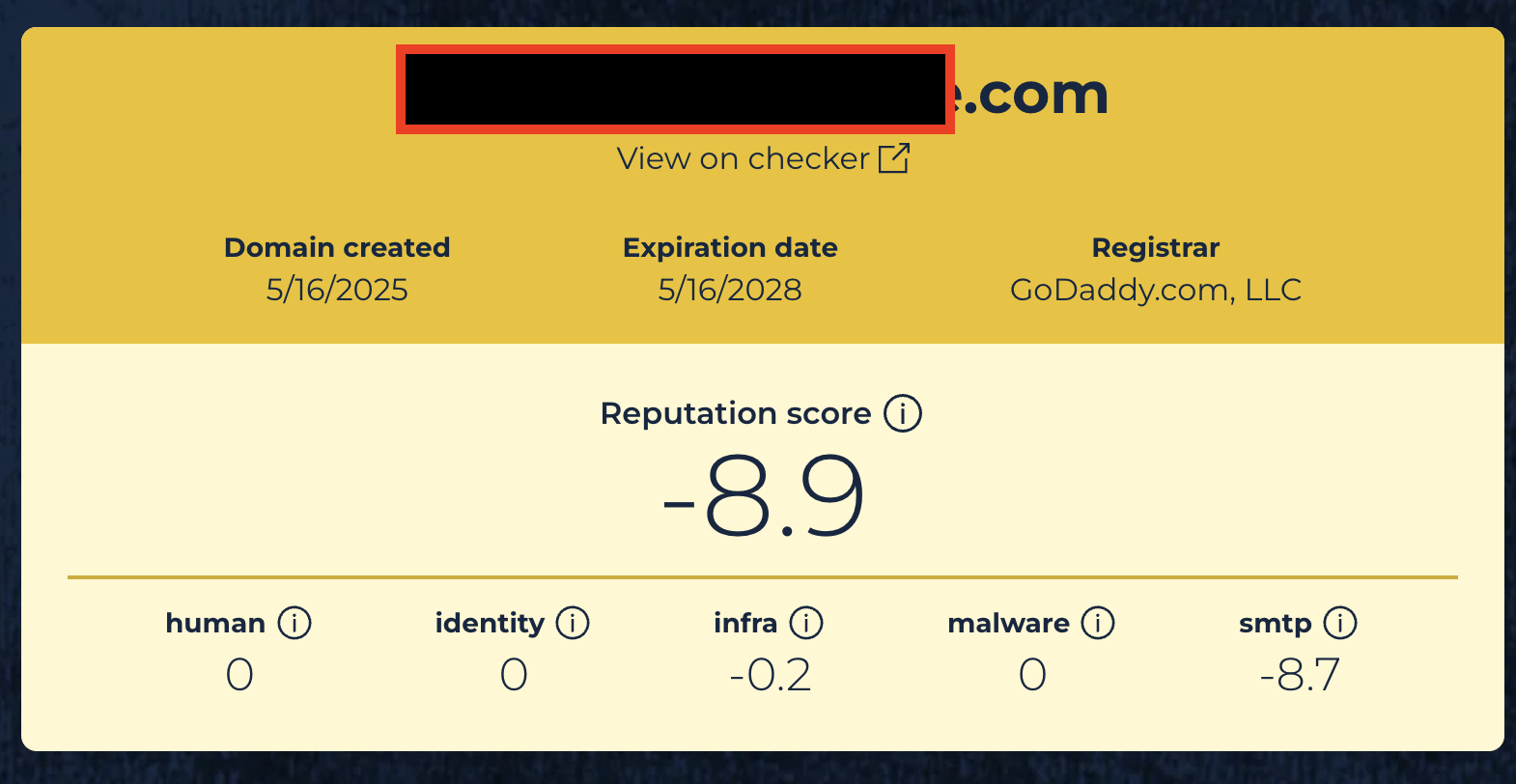
When I started digging, the answer became clear fast. The domain had been flagged by Spamhaus — one of the most widely used blocklists in the world — with a reputation score of -8.9. That's about as bad as it gets.
The root cause? The domain had zero email authentication records. No SPF. No DKIM. No DMARC. Nothing.
Because there were no records telling the internet "only these servers are allowed to send email as this domain," malicious actors had been spoofing the domain — sending spam and phishing emails that appeared to come from it. That abuse tanked the domain's reputation, which cascaded into browser-level safety warnings for the website itself.
The client had no idea any of this was happening. They weren't monitoring email activity because they weren't sending email. But the attackers didn't need their permission.
Why a Non-Email Domain Can Still Become an Abuse Target
This is the misconception I see all the time, especially with agencies and business owners launching new domains for funnels, landing pages, or client projects: "I'm not sending email from this domain, so I don't need email authentication."
That's backwards. If you're NOT sending email from a domain, that's actually more reason to lock it down. Here's why:
When a domain has no SPF or DMARC records, there's nothing stopping anyone on the internet from sending email that looks like it's coming from your domain. Email servers receiving those messages have no way to verify whether the sender is legitimate. So the spam gets delivered, recipients report it, and your domain's reputation takes the hit.
Over time, that abuse gets picked up by blocklist operators like Spamhaus. Once your domain lands on a major blocklist, the damage spreads beyond email. Security tools, browsers, and DNS-based threat feeds all reference these lists. That's how a domain you never emailed from ends up triggering website safety warnings.
What SPF, DKIM, and DMARC Actually Do
If you're not deeply technical, here's the simple version:
SPF (Sender Policy Framework) is a DNS record that tells the world which servers are authorized to send email on behalf of your domain. If a server isn't on the list, receiving mail servers know something's off.
DKIM (DomainKeys Identified Mail) adds a cryptographic signature to outgoing emails. It lets the receiving server verify that the message wasn't tampered with and actually came from your domain.
DMARC (Domain-based Message Authentication, Reporting, and Conformance) ties SPF and DKIM together with a policy. It tells receiving servers what to do when a message fails authentication — and it can send you reports about who's trying to use your domain.
Together, these three records form a shield around your domain's email identity. Without them, your domain is essentially an unlocked car with the keys in the ignition.
How Missing Records Damage Trust, Conversions, and Deliverability
The business impact goes way beyond a technical inconvenience:
Lost website traffic. Browser warnings scare visitors away before they ever see your content. If someone Googles your business and gets a "not safe" warning, they're hitting the back button immediately.
Damaged brand trust. If spam or phishing emails are going out under your domain name, recipients associate that abuse with your brand — even if you had nothing to do with it.
Tanked email deliverability. If you ever do want to send email from that domain in the future, you're starting from a hole. A blocklisted domain with a negative reputation score means your legitimate emails will land in spam or get rejected entirely.
Lost revenue. Every visitor who bounces from a safety warning, every email that hits spam instead of the inbox — that's money left on the table.
For my client, the fix wasn't complicated. But the damage had already been done by the time they found out. That's the thing about domain reputation — it degrades silently until something breaks visibly.
The Fix: DNS Records Every Domain Should Have
Once I identified the Spamhaus listing, I added the protective DNS records, submitted evidence that the domain was now secured, and Spamhaus removed the listing. The website warnings cleared up.
If you have a domain that you do NOT send email from, here are the three records you need to add right now:
1. SPF Record
```
Type: TXT
Host: @
Value: v=spf1 -all
```
This tells the world: "No server is authorized to send email from this domain." Any email claiming to come from your domain will fail SPF checks.
2. DMARC Record
```
Type: TXT
Host: _dmarc
Value: v=DMARC1; p=reject; sp=reject; adkim=s; aspf=s; pct=100
```
This tells receiving servers: "If any email from this domain fails authentication, reject it completely." The strict alignment settings (adkim=s, aspf=s) and 100% enforcement (pct=100) leave no room for abuse.
3. Null MX Record
```
Type: MX
Host: @
Priority: 0
Value: .
```
This tells the world: "This domain does not accept email." It's the DNS equivalent of putting up a "no mailbox here" sign.
These three records take about five minutes to set up and they immediately close the door on domain spoofing.
Prevention Checklist for GoHighLevel Users and Agencies
If you're running campaigns, building funnels, or managing client domains in GoHighLevel, here's what I'd recommend:
Audit every domain you own. Not just the ones you send email from. Every domain tied to your brand, your clients, or your funnels needs authentication records.
Add SPF, DKIM, and DMARC to all domains. For domains you send email from, configure these to authorize your legitimate sending sources. For domains you don't send from, use the restrictive records above.
Check blocklists regularly. Tools like MXToolbox, Spamhaus lookup, and Google Postmaster Tools can tell you if your domains have been flagged before the damage becomes visible.
Monitor new domains immediately after purchase. Don't wait until you're ready to use a domain to protect it. Lock it down the day you buy it.
Don't assume "no email = no risk." As this case study shows, attackers don't care whether you're using the domain for email. They'll use it for you if you leave the door open.
The Takeaway
Your domain is part of your brand whether you're actively emailing from it or not. A simple DNS audit can prevent lost sales, customer distrust, and expensive cleanup work down the road.
I've seen this exact scenario play out dozens of times with business owners and agencies who didn't realize their unused domains were being exploited. The fix is always straightforward — but it's a lot easier to prevent the problem than to recover from it.
---
Need help locking down your domains? I offer domain reputation audits and DNS protection reviews for business owners and agencies. If you're not sure whether your domains are exposed, book a consultation, and I'll take a look.
Matt Ratliff is a senior network engineer and email deliverability expert who helps GoHighLevel users protect sender reputation, improve inbox placement, and prevent avoidable domain-level issues before they affect campaigns and sales.